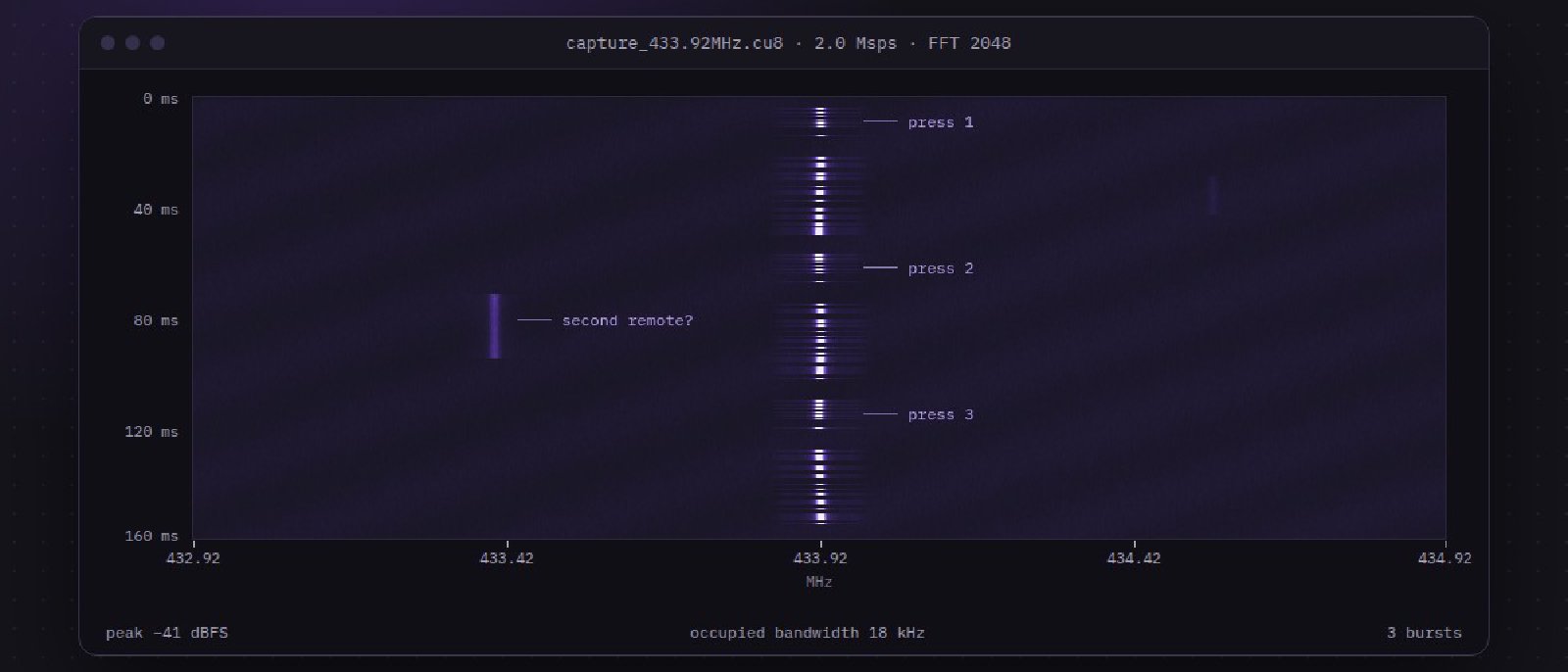
Summary
The remote on my test bench is sold as “rolling code, impossible to clone”. It isn’t. The receiver accepts any frame whose counter sits inside a window of 4,096 values ahead of the last one it saw, and it never invalidates codes that were skipped. A single captured button press therefore stays valid until the owner has pressed the button thousands of times, and in practice that is never. This post walks through the capture, the decoding, and a replay that opened the test door on the first try.
Background
Sub-GHz remotes are everywhere: garage doors, gates, alarm fobs, ceiling fans. Most of them sit in the 433.92 MHz or 868 MHz bands and use simple on-off keying, which makes them a friendly first target for anyone learning to work with software-defined radio.
The target
The device is a two-button remote and a matching receiver board, both bought from a hardware store. The receiver has no network interface and no debug header I could find, so everything here is black-box over the air.
What “rolling code” should mean
A well-built system derives each transmitted code from a shared secret and a counter, and the receiver accepts only a small forward window. Capturing one frame then gives an attacker nothing, because the receiver moves its counter forward as soon as the legitimate frame arrives. The interesting question is always how big that window is, and what happens to codes inside it that were never used.
Method
I kept the setup deliberately boring so that every step can be reproduced with inexpensive gear.
- Tune the SDR to 433.92 MHz with a 2 MHz sample rate and record a few seconds of the remote being pressed.
- Open the recording in a spectrogram viewer and confirm the signal is OOK with a symbol length of about 400 µs.
- Slice the recording into individual frames and demodulate each one to a bit string.
- Press the same button repeatedly and diff the frames to find the fields that change.
Decoding the frame
Every frame starts with a 12-bit preamble of alternating symbols, followed by a 4-bit button identifier, a 24-bit counter and a 32-bit value that looks like a keyed hash. Diffing ten presses made the layout obvious, because only the counter and the hash changed.
import numpy as np

SYMBOL_US = 400
SAMPLE_RATE = 2_000_000

def demod(iq: np.ndarray) -> str:
    """Slice an OOK recording into a bit string."""
    env = np.abs(iq)
    thresh = (env.max() + env.min()) / 2
    bits = env > thresh
    per_symbol = int(SAMPLE_RATE * SYMBOL_US / 1_000_000)
    return "".join("1" if bits[i : i + per_symbol].mean() > 0.5 else "0"
                   for i in range(0, len(bits) - per_symbol, per_symbol))
A decoded frame, with the fields split out, looks like this:
preamble  101010101010
button    0001
counter   000000000000100111000101
hash      10111100010010101101000111001010
Lining ten presses up side by side shows the pattern at a glance: the preamble and the button never change, the counter ticks up by one, and the hash looks random.
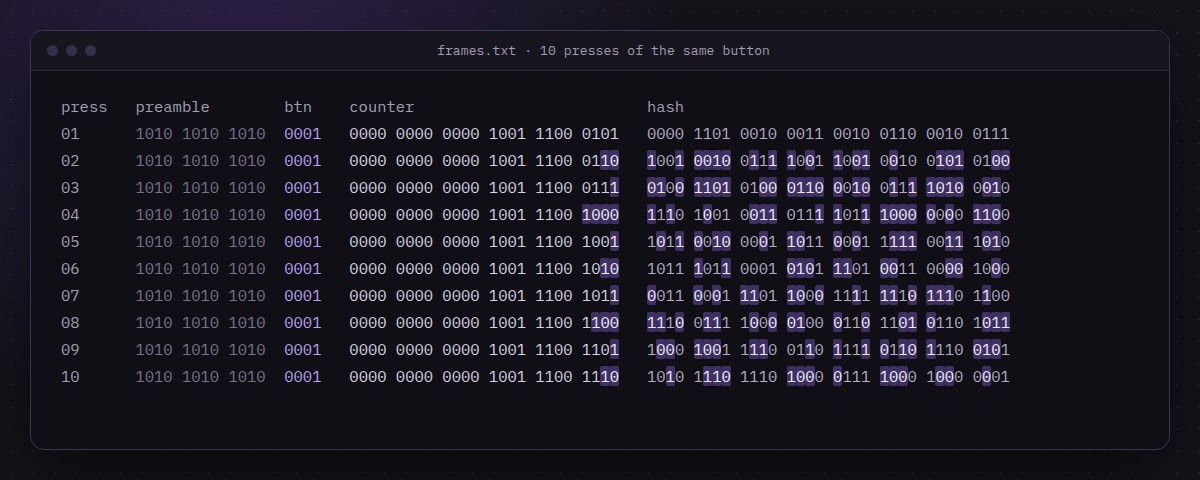 Ten presses of the same button, aligned by field. Highlighted bits changed since the previous press.
Findings
The counter increments by one per press, and the hash changes with it. I could not recover the hash function, and I did not need to: the receiver does not check that a replayed hash matches the latest counter, only that the counter is within its window.
| Test | Counter offset from last seen | Receiver response |
|---|---|---|
| Replay of latest frame | 0 | Opens |
| Replay of a frame 1,000 presses old | −1,000 | Ignored |
| Replay of a captured future frame | +1,500 | Opens |
| Replay of a captured future frame | +5,000 | Ignored |
The window is therefore at least 1,500 codes wide, and bisecting the boundary put the edge at 4,096. Two further observations made it worse:
- Skipped codes are never invalidated, so a stockpile of frames captured while the owner is away stays usable.
- Pressing the button out of range advances the remote’s counter without advancing the receiver’s, which widens the effective window over time.
Rolling codes only help when the receiver is strict about the window. A wide window turns a rolling code into a slightly longer fixed code.
Takeaways
For vendors: shrink the acceptance window to single digits, invalidate skipped codes on resync, and require a second button press to resynchronise. For owners of this class of remote: treat it as a convenience, not a lock, and do not use it as the only barrier to anything valuable.
For me, the main lesson was how far a spectrogram and a diff get you before any reverse engineering of firmware is needed. Next I want to see whether the same weakness shows up in the vendor’s 868 MHz alarm fob.